Rotem Egozy
Amplio - Educator Caseload
My Role
UI, UX
Year
2023
Tools
Figma
Background
Amplio is a learning platform for special education that integrates a learning management system with structured programs and curricula for dyslexia, designed for educators, students, and administrators. When I joined Amplio as a team member, the company was preparing for a funding round and was therefore focused on improving, operating, and enhancing the platform's user experience. I joined the team alongside a UX designer and a product manager, and we worked together throughout the project in a high-quality collaborative effort.
Educator caseload project overview
Educators are in charge of the students assigned to them, this can become increasingly difficult the more students assigned. In order to plan their work with students, an educator must know what has been assigned to each student prior, and how the student performed. Additionally all the information regarding a student’s grade, school, and group they are in are also important factors when trying to assess the student’s needs and their current interaction level with provided assignments.
In Amplio, those problems were meant to be solved in large by the student page, however, in order to resolve the aforementioned pains, there are multiple additions and changes required.

Design process, goals, and challenges
Challenges:
- Large number of students: The high number of students makes it difficult for teachers to provide personalized attention and adapt to the individual needs of each student.
- Need for flexibility in lesson planning: Teachers are required to design lessons that allow for personalization, which demands maximum flexibility in the preparation process.
- Commitment to a rigid curriculum: Teachers are bound by a strict and structured curriculum, and if they fail to meet the targets, they may face complaints and even lawsuits from parents.
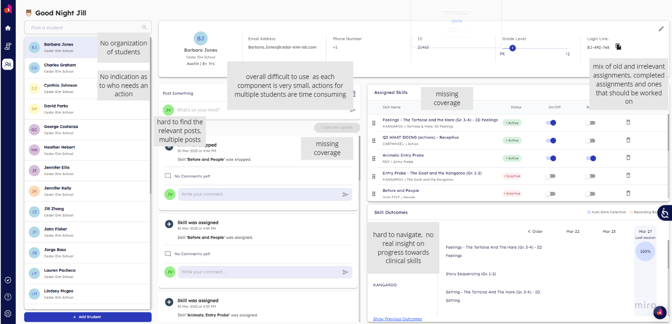
Old Screen
At the beginning of this project, I met with the PM and Design Lead. In this meeting, the project was introduced to me, the design goals were presented, and we made initial sketches of the screen layouts. From there, I took over the project.
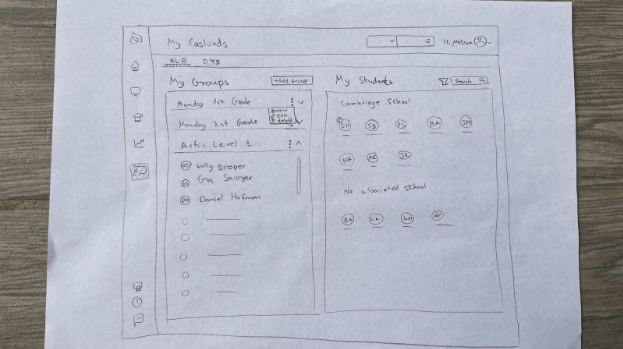
Sketch of Main Page
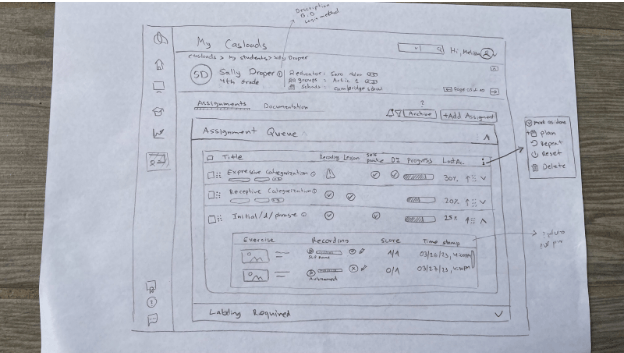
Sketch of Assignment View - Single Student
Understanding these challenges and pain points led me to the following solutions:
- The cognitive load is resolved through the table organization of groups and students.
- Adding flexibility through adaptability in queue organization and states of exercises.
- Meeting curriculum objectives is reflected in the recording and the assessed quality of the recording, which allows for providing accurate grades that support the curriculum.
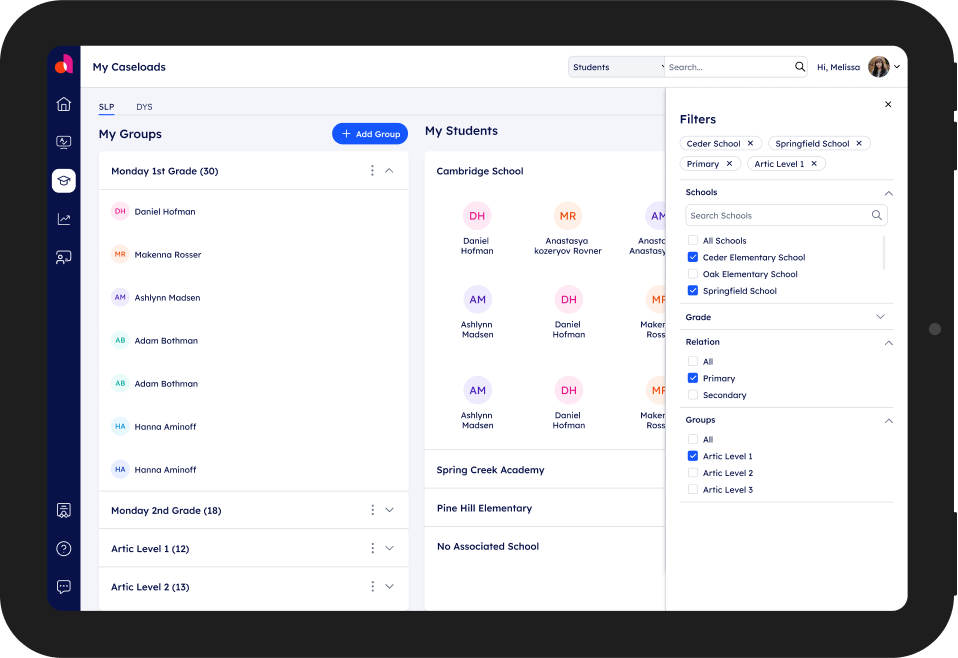
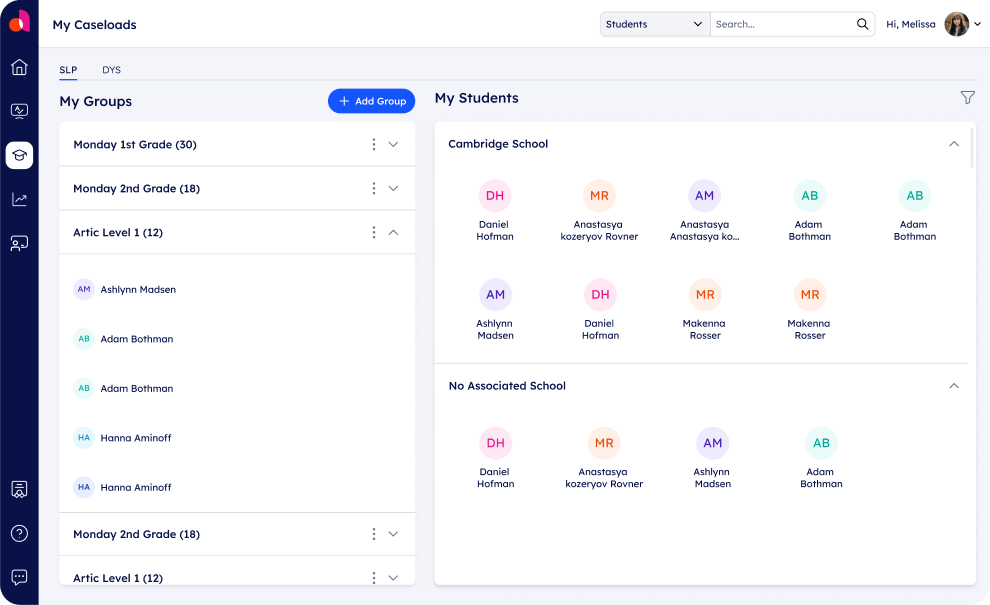
Example of organization screen filtered by Groups and Students
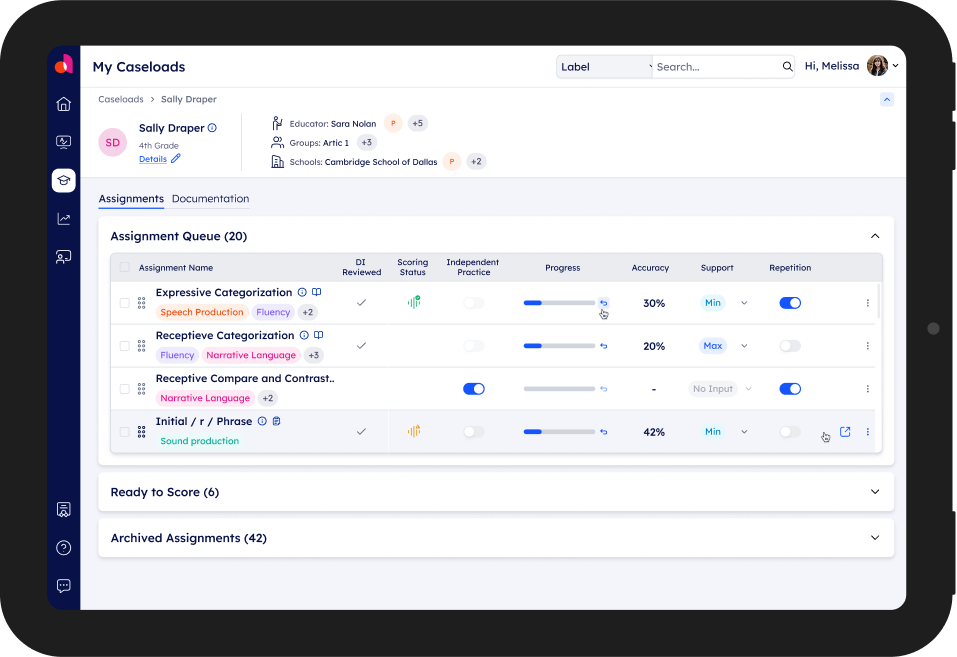
Example of the Educator’s Assignment Queue
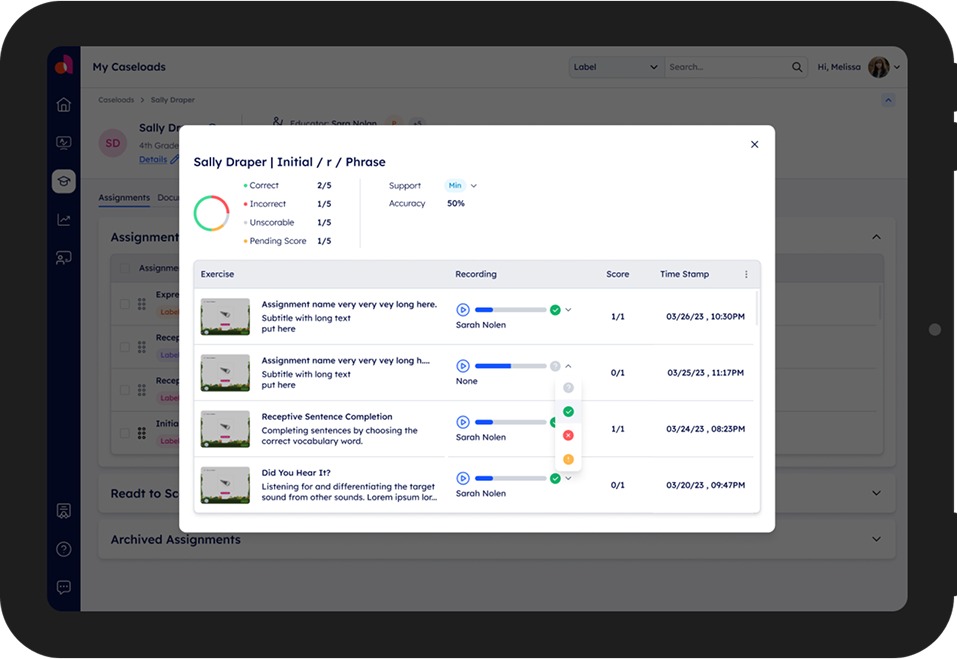
Example of Exercise Drill Down
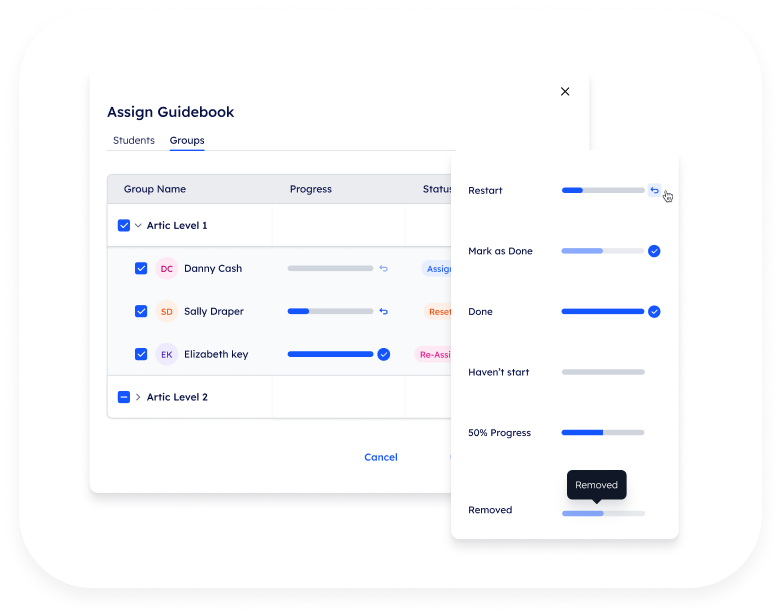
A good example for solving the third pain point (meeting curriculum) is the assignment’s progress bar.
It was designed in a way that accommodates several scenarios:
- Displaying the student's progress in a task (for this, I had to design and define several states).
- Presenting details regarding student’s recording, with the addition of either automatic cataloging of the student's recording by the system or manual cataloging by the teacher.
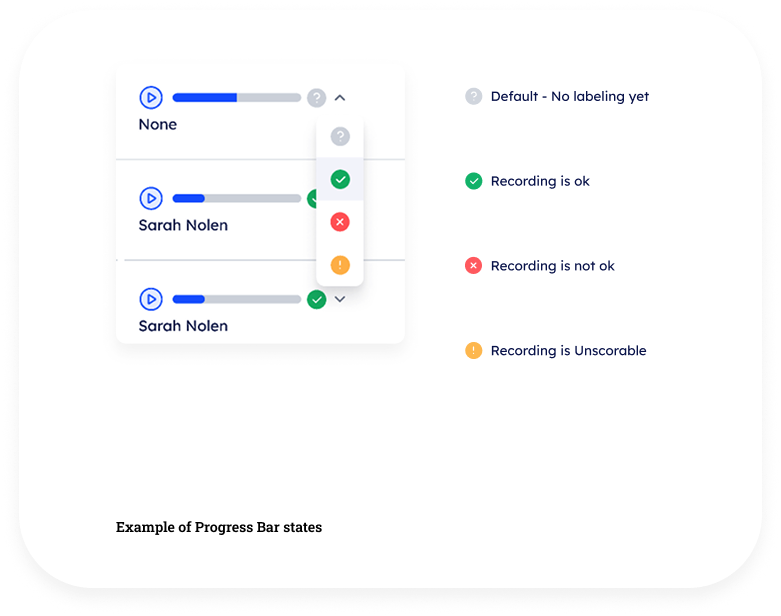
In retrospect
During my time as a product designer at Amplio, I encountered exciting challenges in the field of user experience design. I raised issues related to UX that needed to be rethought and redefined. This was a crucial point in the project, as there were areas in the system that didn’t function properly from the start and required solutions. I also needed to think through and solve edge cases for various scenarios, from empty states to UI solutions that were not yet part of the design system. One of the main aspects of the role was creating design solutions that supported both the company’s goals and the users' needs while maintaining an intuitive and personalized user experience. Close collaboration with the development, marketing, and product teams allowed me to deeply understand customer needs and business objectives, leading to effective design solutions.
Working at Amplio sharpened my skills in balancing aesthetic appeal with high functionality and provided valuable insights into large-scale digital product design processes.
I'm looking for my next experience,
please feel free to contact me
rotemegozy@gmail.com // Tel: 054.7694270
Rotem Egozy
About & Contact
Amplio - Educator Caseload
My Role
UI, UX
Year
2023
Tools
Figma
Background
Amplio is a learning platform for special education that integrates a learning management system with structured programs and curricula for dyslexia, designed for educators, students, and administrators. When I joined Amplio as a team member, the company was preparing for a funding round and was therefore focused on improving, operating, and enhancing the platform's user experience. I joined the team alongside a UX designer and a product manager, and we worked together throughout the project in a high-quality collaborative effort.
Educator caseload project overview
Educators are in charge of the students assigned to them, this can become increasingly difficult the more students assigned. In order to plan their work with students, an educator must know what has been assigned to each student prior, and how the student performed. Additionally all the information regarding a student’s grade, school, and group they are in are also important factors when trying to assess the student’s needs and their current interaction level with provided assignments.
In Amplio, those problems were meant to be solved in large by the student page, however, in order to resolve the aforementioned pains, there are multiple additions and changes required.
Design process, goals, and challenges
Challenges:
- Large number of students: The high number of students makes it difficult for teachers to provide personalized attention and adapt to the individual needs of each student.
- Need for flexibility in lesson planning: Teachers are required to design lessons that allow for personalization, which demands maximum flexibility in the preparation process.
- Commitment to a rigid curriculum: Teachers are bound by a strict and structured curriculum, and if they fail to meet the targets, they may face complaints and even lawsuits from parents.
Old Screen
At the beginning of this project, I met with the PM and Design Lead. In this meeting, the project was introduced to me, the design goals were presented, and we made initial sketches of the screen layouts. From there, I took over the project.
Sketch of Main Page
Sketch of Assignment View - Single Student
Understanding these challenges and pain points led me to the following solutions:
- The cognitive load is resolved through the table organization of groups and students.
- Adding flexibility through adaptability in queue organization and states of exercises.
- Meeting curriculum objectives is reflected in the recording and the assessed quality of the recording, which allows for providing accurate grades that support the curriculum.
Example of organization screen filtered by Groups and Students
Example of the Educator’s Assignment Queue
Example of Exercise Drill Down
A good example for solving the third pain point (meeting curriculum) is the assignment’s progress bar.
It was designed in a way that accommodates several scenarios:
- Displaying the student's progress in a task (for this, I had to design and define several states).
- Presenting details regarding student’s recording, with the addition of either automatic cataloging of the student's recording by the system or manual cataloging by the teacher.
In retrospect
During my time as a product designer at Amplio, I encountered exciting challenges in the field of user experience design. I raised issues related to UX that needed to be rethought and redefined. This was a crucial point in the project, as there were areas in the system that didn’t function properly from the start and required solutions. I also needed to think through and solve edge cases for various scenarios, from empty states to UI solutions that were not yet part of the design system. One of the main aspects of the role was creating design solutions that supported both the company’s goals and the users' needs while maintaining an intuitive and personalized user experience. Close collaboration with the development, marketing, and product teams allowed me to deeply understand customer needs and business objectives, leading to effective design solutions.
Working at Amplio sharpened my skills in balancing aesthetic appeal with high functionality and provided valuable insights into large-scale digital product design processes.
I'm looking for my next experience,
please feel free to contact me
rotemegozy@gmail.com // Tel: 054.7694270

Back to home